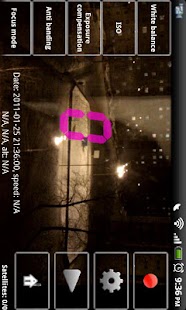
VideoReg
For Android 4.4 and higher folder in external SD card must be /path_to_SDcard/Android/data/rubberbigpepper.VideoReg Folder is case sensitive.
Folder must be created (if it does not exist) by built in (in phone ROM!) file browser and selected in VideoReg.VideoReg enregistre le marquage de la route et les actions d’autre usagers de la route.La possibilité de la superposition de l’image avec GPS-données aides de fixer correctment l’emplacement et la vitesse de marche.Ce programme pourverra le controle automatic de l’utilisation de la place dans la mémoire à garder les video
Intentions de travailler avec Tasker:"rubberbigpepper.VideoReg.StartRecord" - début de l'enregistrement"rubberbigpepper.VideoReg.StopRecord" - arrêt de l'enregistrement"rubberbigpepper.VideoReg.RescueVideo"-enregistrer la vidéo importante"rubberbigpepper.VideoReg.CapturePhoto" - photo capture"rubberbigpepper.VideoReg.ShowMainWindow" - montrant la fenêtre principale"rubberbigpepper.VideoReg.HideMainWindow" - cacher la fenêtre principale"rubberbigpepper.VideoReg.Exit" - quitter le programme"rubberbigpepper.VideoReg.ImportSettings" - les paramètres d'importation, lorsqu'il est utilisé avec le "Nom de fichier" option supplémentaire le nom du fichier avec le chemin, l'importation serait hors de lui"rubberbigpepper.VideoReg.ExportSettings" - les paramètres d'exportation, lorsqu'il est utilisé avec le "Nom de fichier" option supplémentaire le nom du fichier avec le chemin, il sera exporté"rubberbigpepper.VideoReg.HideMainButtons" - cache les boutons de commande principaux"rubberbigpepper.VideoReg.ShowMainButtons" - affiche les boutons de commande principaux"rubberbigpepper.VideoReg.SwitchCamera" - caméras de commutation"rubberbigpepper.VideoReg.GPSOn" - pour activer le GPS"rubberbigpepper.VideoReg.GPSOff" - désactiver le GPS
About VideoReg
- Package name (App ID)
- rubberbigpepper.VideoReg
- Available on
- Google Play
- Price
- Free
- Version
- v7.01
- Developer
- Sygic.
Looking for the VideoReg APK?
The safest way to get VideoReg (rubberbigpepper.VideoReg) on your Android device is to install it directly from Google Play — you'll always get the latest official version, automatic updates, and no risk of modified or infected APK files from third-party sites.
Camera Features
Advanced camera features with editing capabilities.
Fitness Tracking
Track your workouts and monitor your health metrics.
Productivity Tools
Boost your productivity with powerful tools and features.
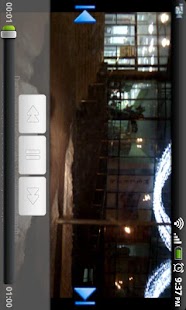
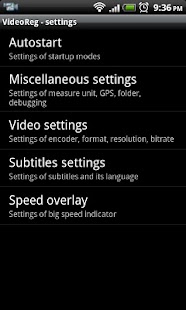
Decouvrez VideoReg en action
Frequently Asked Questions
Is VideoReg free?
Yes, VideoReg is free to download and install on Android through Google Play.
How do I install VideoReg on Android?
Open Google Play on your Android phone or tablet, search for VideoReg by Sygic. or tap the Google Play button on this page, then tap Install. The app downloads and installs automatically.
What is rubberbigpepper.VideoReg?
rubberbigpepper.VideoReg is the App ID (package name) of VideoReg on Google Play. Every Android app has a unique package name, and it is the safest way to verify you are installing the official app.
Is VideoReg safe to download?
Installing VideoReg from Google Play is the safest option: you get the official version published by Sygic., verified by Google Play Protect, with automatic updates. Avoid APK files from unofficial third-party sites.
Get VideoReg Today
VideoReg for Android — free download on Google Play.
Compatible with Android phones and tablets — available on Google Play.
Vous aimez cette appli ?
Partagez-la avec vos amis et votre famille sur votre reseau social prefere.
Posez vos questions a l'IA
Obtenez des reponses instantanees sur les fonctionnalites et astuces.