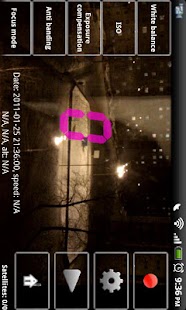
VideoReg
For Android 4.4 and higher folder in external SD card must be /path_to_SDcard/Android/data/rubberbigpepper.VideoReg Folder is case sensitive.
Folder must be created (if it does not exist) by built in (in phone ROM!) file browser and selected in VideoReg.VideoReg records road-marking, traffic signs and actions of other participants of the traffic.The capability of the compositing datas with GPS helps to fix positions and speed.
VideoReg will make the recording process easy and handy for daily use.It will provied the automatic control of the storage space for the recordings.
Intents to work with Tasker:"rubberbigpepper.VideoReg.StartRecord" - start recording"rubberbigpepper.VideoReg.StopRecord" - stop recording"rubberbigpepper.VideoReg.RescueVideo" -save important video"rubberbigpepper.VideoReg.CapturePhoto" - photo capturing"rubberbigpepper.VideoReg.ShowMainWindow" - showing the main window"rubberbigpepper.VideoReg.HideMainWindow" - hide the main window"rubberbigpepper.VideoReg.Exit" - exit the program"rubberbigpepper.VideoReg.ImportSettings" - import settings, when used with the Extra option "File name" the file name with path, import would be out of it"rubberbigpepper.VideoReg.ExportSettings" - export settings, when used with the Extra option "File name" the file name with path, it will be exported"rubberbigpepper.VideoReg.HideMainButtons" - hides the main control buttons"rubberbigpepper.VideoReg.ShowMainButtons" - shows the main control buttons"rubberbigpepper.VideoReg.SwitchCamera" - switching cameras"rubberbigpepper.VideoReg.GPSOn" - turn on GPS"rubberbigpepper.VideoReg.GPSOff" - turn off GPS
About VideoReg
- Package name (App ID)
- rubberbigpepper.VideoReg
- Available on
- Google Play
- Price
- Free
- Version
- v7.01
- Developer
- Sygic.
Looking for the VideoReg APK?
The safest way to get VideoReg (rubberbigpepper.VideoReg) on your Android device is to install it directly from Google Play — you'll always get the latest official version, automatic updates, and no risk of modified or infected APK files from third-party sites.
Camera Features
Advanced camera features with editing capabilities.
Fitness Tracking
Track your workouts and monitor your health metrics.
Productivity Tools
Boost your productivity with powerful tools and features.
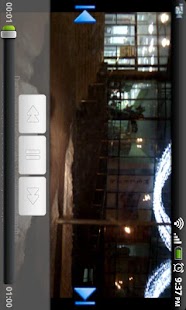
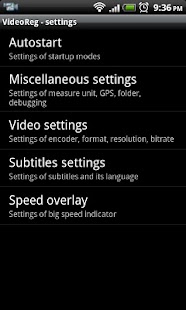
See VideoReg in Action
Frequently Asked Questions
Is VideoReg free?
Yes, VideoReg is free to download and install on Android through Google Play.
How do I install VideoReg on Android?
Open Google Play on your Android phone or tablet, search for VideoReg by Sygic. or tap the Google Play button on this page, then tap Install. The app downloads and installs automatically.
What is rubberbigpepper.VideoReg?
rubberbigpepper.VideoReg is the App ID (package name) of VideoReg on Google Play. Every Android app has a unique package name, and it is the safest way to verify you are installing the official app.
Is VideoReg safe to download?
Installing VideoReg from Google Play is the safest option: you get the official version published by Sygic., verified by Google Play Protect, with automatic updates. Avoid APK files from unofficial third-party sites.
Get VideoReg Today
VideoReg for Android — free download on Google Play.
Compatible with Android phones and tablets — available on Google Play.
Ask AI about this app
Get instant answers about features, tips and more from popular AI assistants.